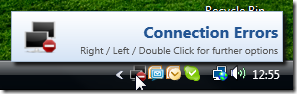
I just published a maintenance release of my WPF NotifyIcon control. The update fixes an issue with potential null references during initialization.
Links and downloads as usual on the control’s project page. Happy coding!
I just published a maintenance release of my NotifyIcon control, which addresses a potential null reference issue, and optionally removes the double-click delay, which allows the NotifyIcon to react to single clicks immediately.
Links and downloads as usual on the control’s project page. Happy coding!
XAML UI designer / developer? We’re hiring!

My work at Vistaprint is focused on the UI architecture of the distributed software system that runs in our factories. Today, we process more than 120,000 individually customized pieces in over 70,000 shipments per day, with diverse human-machine interaction taking place while produced items are making their way through the plant. This includes desktops, touch panels, handhelds, or dashboards. And we are currently trying to rethink the way our UIs should work – which is where YOU come in: A brilliant UI designer, XAML wizard, UX geek, who wants to make a difference and join us in implementing an exciting, cutting edge UI infrastructure that will support both our stakeholders on the factory floor as your fellow developers all around the globe. Recognize yourself? Come join us in our beautiful, and slightly chaotic Winterthur office in Switzerland!

Job details here:
http://careers.vistaprint.com/winterthur/technology/lead-software-engineer%2c-ui-development/10869
Take the wording on the posting with a grain of salt. We really are looking for a Blend wizard more than a Visual Studio crack. This is all about creating exciting user interfaces, and evangelizing / teaching UI goodness to a globally distributed team.
I just published a maintenance release of my NotifyIcon control, which addresses a few (long due) issues, most notably for applications that target more recent versions of the .NET framework, or x64 applications.
Source code and samples can be downloaded via the control’s project page. Alternatively, there’s now also an official NuGet package for the control (binaries only) that contains builds for .NET 3.5 up to 4.5.1.
What’s next?
I already started working on a new version of the control. The most important feature will be interactive tooltips (so you can hover over them and interact with clickable content), along with a few minor new features. Check back in a few days/weeks, or follow me on Twitter in order to get the update once it’s released. Also, if you have specific feature requests, let me know!
I just uploaded an updated version of the clickable ToolTips library I released this month. The changes add string formatting for bindings, plus the option to disable ToolTips via a the bindable boolean IsEnabled flag. You can download the current version 1.0.1 here.

Download sources, binaries, and sample application (Version: 1.0.1, 2013.11.22)
A few years ago, I posted an article that leveraged markup extensions to quickly show localized ToolTips with minimal effort. Fast forward to 2013: I still like ToolTips, but interactive / clickable ones would be nice, and there’s Blend Behaviors that provides developers with a great design-time experience. As a result, I wrote a simple control and a complementary Blend Behavior that get’s me quite a bit of flexibility with minimal impementation effort.
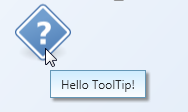
The behavior allows you very easily create simple ToolTips like this:
However, it doesn’t stop there. The following Blend Behavior generates an error ToolTip:
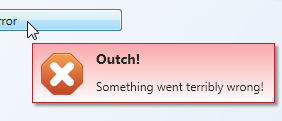
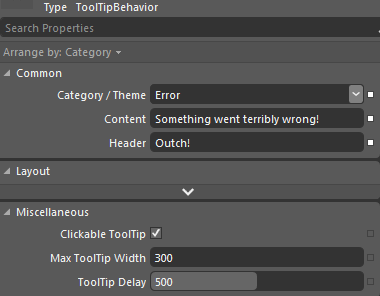
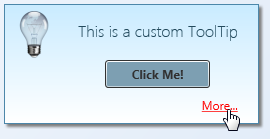
Also, unlike the built-in ToolTip service, the behavior supports interactive/clickable ToolTips. As the ToolTip takes arbitary XAML or a user control for Content or Header properties, you can display arbitrary controls on the popup.
Features at a glance:
- Blend Behavior with design-time support – you can setup rich ToolTips within Blend in a matter of seconds.
- Unlike regular ToolTips, those are clickable – you can put interactive content such as buttons or Hyperlinks on them.
- Built-in header / content support.
- Data Binding and MVVM-friendly.
- Content and header not limited to text.
- Built-in themes: You can show a ToolTip as an information, warning, or error.
- If bound to strings, values can be formatted on the fly using the HeaderStringFormat and ContentStringFormat properties.
- Disabling ToolTips through a bindable IsEnabled flag.
Some final notes: I didn’t make everything configurable – that would have been overkill for the scope of a ToolTip. Instead, I recommend you to tweak the control styles to your needs. Things you might want to change:
- When being displayed, ToolTips are slightly transparent – full opacity is only set if you hover over them. You can easily adjust this in the animation that fades in the control.
- If you shorten the delay in which the ToolTip is being displayed remarkably, you should also adjust animations (fade-in / fade-out in order to not cut them off.
- Placement of the ToolTip’s popup (near Mouse pointer) is currently hardcoded in the Behavior class.
Happy coding 🙂