Archive

Archive for the ‘C#’ Category

String Encryption using DPAPI and Extension Methods

April 12th, 2009

Latest Version: 2009.04.14 (Bugfix in Matches extension method)


The Windows Data Protection API (DPAPI) is a great technology to securely encrypt user or machine specific data without having to worry about an encryption key. Since .NET 2.0, DPAPI is part of the .NET framework, so encrypting data is as easy as this:


public static byte[] Encrypt(byte[] data)
{
  var scope = DataProtectionScope.CurrentUser;
  return ProtectedData.Protect(data, null, scope);
}


As you can see, the Protect method of the ProtectedData class takes binary input and returns a byte array that contains the encrypted data. This means that you’ll have to do some conversions when dealing with strings, and the result of the encryption is a byte array anyway.

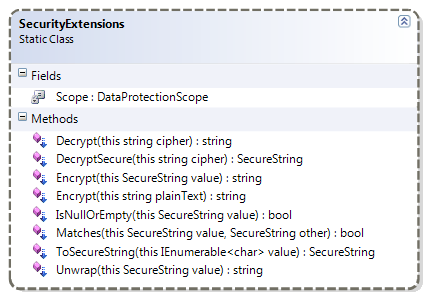
NetDrives relies on the DPAPI to encrypt user passwords that are stored on disk. Accordingly, I didn’t want to deal with binary data at all: Both input and output were supposed to be strings, which why I came up with a few extension methods that nicely wrap string encryptions for me:

image


Basic String Encryption

In case in-memory protection is not an issue and you just need to encrypt/decrypt strings (e.g. to store encrypted data in a configuration file), you just need two extension methods. First, in order to encrypt a string, just invoke the Encrypt extension method:

string password = "hello world";
string encrypted = password.Encrypt();


Encrypt returns you the encrypted data, represented as base64 encoded string. In order to get your password back, just invoke the Decrypt extension method:

string plainText = encrypted.Decrypt();


Managed Strings vs. SecureString

The above methods are convenient to encrypt sensitive data that is supposed to be serialized or transmitted in any way. They do, however, not protect data at runtime as the decrypted strings remain in memory. In case this is an issue, you should revert to the SecureString rather than using plain strings (but keep in mind that this may lure you into a false sense of security!).

Accordingly, I also created extension methods that use SecureString instances rather than managed strings and allow you to wrap / unwrap strings quite easily. Here’s a test that shows off the various conversions:

Attention: Always keep in mind that once you are dealing with a managed string (such as the plainText variable below), your code can be compromised! Accordingly, the ToSecureString / Unwrap methods should be treated carefully.


[Test]
public void Encryption_And_Decryption_Cycle_Should_Return_Original_Value()
{
  string plainText = "this is a password";

  //encrypt plain text
  string cipher = plainText.Encrypt();
  Assert.AreNotEqual(plainText, cipher);

  //decrypt cipher into managed string
  string decrypted = cipher.Decrypt();
  Assert.AreEqual(plainText, decrypted);

  //create a SecureString from the plain text
  SecureString plainSecure = plainText.ToSecureString();

  //test unwrapping of a SecureString
  Assert.AreEqual(plainText, plainSecure.Unwrap());

  //encrypt the string that is wrapped into the SecureString
  string cipherFromSecure = plainSecure.Encrypt();

  //decrypt the cipher that was created from the the SecureString
  Assert.AreEqual(plainText, cipherFromSecure.Decrypt());
}


Implementation

Here’s the class that provides the extension methods including a few helper methods that facilitate dealing with SecureString (e.g. SecureString.IsNullOrEmpty).

Note that you need to set an assembly reference to the System.Security assembly. Also keep in mind that the class always performs DPAPI encryption with user scope. You might want to provide some additional overloads in order to support encryption that uses the context of the machine rather than the user’s. The same goes for the optional entropy that is not used at all for simplicity.

kick it on DotNetKicks.com


using System;
using System.Collections.Generic;
using System.Linq;
using System.Runtime.InteropServices;
using System.Security;
using System.Security.Cryptography;
using System.Text;

namespace Hardcodet.NetDrives.Platform
{
  /// <summary>
  /// Provides extension methods that deal with
  /// string encryption/decryption and
  /// <see cref="SecureString"/> encapsulation.
  /// </summary>
  public static class SecurityExtensions
  {
    /// <summary>
    /// Specifies the data protection scope of the DPAPI.
    /// </summary>
    private const DataProtectionScope Scope = DataProtectionScope.CurrentUser;

    /// <summary>
    /// Encrypts a given password and returns the encrypted data
    /// as a base64 string.
    /// </summary>
    /// <param name="plainText">An unencrypted string that needs
    /// to be secured.</param>
    /// <returns>A base64 encoded string that represents the encrypted
    /// binary data.
    /// </returns>
    /// <remarks>This solution is not really secure as we are
    /// keeping strings in memory. If runtime protection is essential,
    /// <see cref="SecureString"/> should be used.</remarks>
    /// <exception cref="ArgumentNullException">If <paramref name="plainText"/>
    /// is a null reference.</exception>
    public static string Encrypt(this string plainText)
    {
      if (plainText == null) throw new ArgumentNullException("plainText");

      //encrypt data
      var data = Encoding.Unicode.GetBytes(plainText);
      byte[] encrypted = ProtectedData.Protect(data, null, Scope);

      //return as base64 string
      return Convert.ToBase64String(encrypted);
    }

    /// <summary>
    /// Decrypts a given string.
    /// </summary>
    /// <param name="cipher">A base64 encoded string that was created
    /// through the <see cref="Encrypt(string)"/> or
    /// <see cref="Encrypt(SecureString)"/> extension methods.</param>
    /// <returns>The decrypted string.</returns>
    /// <remarks>Keep in mind that the decrypted string remains in memory
    /// and makes your application vulnerable per se. If runtime protection
    /// is essential, <see cref="SecureString"/> should be used.</remarks>
    /// <exception cref="ArgumentNullException">If <paramref name="cipher"/>
    /// is a null reference.</exception>
    public static string Decrypt(this string cipher)
    {
      if (cipher == null) throw new ArgumentNullException("cipher");

      //parse base64 string
      byte[] data = Convert.FromBase64String(cipher);

      //decrypt data
      byte[] decrypted = ProtectedData.Unprotect(data, null, Scope);
      return Encoding.Unicode.GetString(decrypted);
    }

    /// <summary>
    /// Encrypts the contents of a secure string.
    /// </summary>
    /// <param name="value">An unencrypted string that needs
    /// to be secured.</param>
    /// <returns>A base64 encoded string that represents the encrypted
    /// binary data.
    /// </returns>
    /// <exception cref="ArgumentNullException">If <paramref name="value"/>
    /// is a null reference.</exception>
    public static string Encrypt(this SecureString value)
    {
      if (value == null) throw new ArgumentNullException("value");

      IntPtr ptr = Marshal.SecureStringToCoTaskMemUnicode(value);
      try
      {
        char[] buffer = new char[value.Length];
        Marshal.Copy(ptr, buffer, 0, value.Length);

        byte[] data = Encoding.Unicode.GetBytes(buffer);
        byte[] encrypted = ProtectedData.Protect(data, null, Scope);

        //return as base64 string
        return Convert.ToBase64String(encrypted);
      }
      finally
      {
        Marshal.ZeroFreeCoTaskMemUnicode(ptr);
      }
    }

    /// <summary>
    /// Decrypts a base64 encrypted string and returns the decrpyted data
    /// wrapped into a <see cref="SecureString"/> instance.
    /// </summary>
    /// <param name="cipher">A base64 encoded string that was created
    /// through the <see cref="Encrypt(string)"/> or
    /// <see cref="Encrypt(SecureString)"/> extension methods.</param>
    /// <returns>The decrypted string, wrapped into a
    /// <see cref="SecureString"/> instance.</returns>
    /// <exception cref="ArgumentNullException">If <paramref name="cipher"/>
    /// is a null reference.</exception>
    public static SecureString DecryptSecure(this string cipher)
    {
      if (cipher == null) throw new ArgumentNullException("cipher");

      //parse base64 string
      byte[] data = Convert.FromBase64String(cipher);

      //decrypt data
      byte[] decrypted = ProtectedData.Unprotect(data, null, Scope);

      SecureString ss = new SecureString();

      //parse characters one by one - doesn't change the fact that
      //we have them in memory however...
      int count = Encoding.Unicode.GetCharCount(decrypted);
      int bc = decrypted.Length/count;
      for (int i = 0; i < count; i++)
      {
        ss.AppendChar(Encoding.Unicode.GetChars(decrypted, i*bc, bc)[0]);
      }

      //mark as read-only
      ss.MakeReadOnly();
      return ss;
    }

    /// <summary>
    /// Wraps a managed string into a <see cref="SecureString"/> 
    /// instance.
    /// </summary>
    /// <param name="value">A string or char sequence that 
    /// should be encapsulated.</param>
    /// <returns>A <see cref="SecureString"/> that encapsulates the
    /// submitted value.</returns>
    /// <exception cref="ArgumentNullException">If <paramref name="value"/>
    /// is a null reference.</exception>
    public static SecureString ToSecureString(this IEnumerable<char> value)
    {
      if (value == null) throw new ArgumentNullException("value");

      var secured = new SecureString();

      var charArray = value.ToArray();
      for (int i = 0; i < charArray.Length; i++)
      {
        secured.AppendChar(charArray[i]);
      }

      secured.MakeReadOnly();
      return secured;
    }

    /// <summary>
    /// Unwraps the contents of a secured string and
    /// returns the contained value.
    /// </summary>
    /// <param name="value"></param>
    /// <returns></returns>
    /// <remarks>Be aware that the unwrapped managed string can be
    /// extracted from memory.</remarks>
    /// <exception cref="ArgumentNullException">If <paramref name="value"/>
    /// is a null reference.</exception>
    public static string Unwrap(this SecureString value)
    {
      if (value == null) throw new ArgumentNullException("value");

      IntPtr ptr = Marshal.SecureStringToCoTaskMemUnicode(value);
      try
      {
        return Marshal.PtrToStringUni(ptr);
      }
      finally
      {
        Marshal.ZeroFreeCoTaskMemUnicode(ptr);
      }
    }

    /// <summary>
    /// Checks whether a <see cref="SecureString"/> is either
    /// null or has a <see cref="SecureString.Length"/> of 0.
    /// </summary>
    /// <param name="value">The secure string to be inspected.</param>
    /// <returns>True if the string is either null or empty.</returns>
    public static bool IsNullOrEmpty(this SecureString value)
    {
      return value == null || value.Length == 0;
    }

    /// <summary>
    /// Performs bytewise comparison of two secure strings.
    /// </summary>
    /// <param name="value"></param>
    /// <param name="other"></param>
    /// <returns>True if the strings are equal.</returns>
    public static bool Matches(this SecureString value, SecureString other)
    {
      if (value == null && other == null) return true;
      if (value == null || other == null) return false;
      if (value.Length != other.Length) return false;
      if (value.Length == 0 && other.Length == 0) return true;

      IntPtr ptrA = Marshal.SecureStringToCoTaskMemUnicode(value);
      IntPtr ptrB = Marshal.SecureStringToCoTaskMemUnicode(other);
      try
      {
        //parse characters one by one - doesn't change the fact that
        //we have them in memory however...
        byte byteA = 1;
        byte byteB = 1;

        int index = 0;
        while (((char)byteA) != '\0' && ((char)byteB) != '\0')
        {
          byteA = Marshal.ReadByte(ptrA, index);
          byteB = Marshal.ReadByte(ptrB, index);
          if (byteA != byteB) return false;
          index += 2;
        }

        return true;
      }
      finally
      {
        Marshal.ZeroFreeCoTaskMemUnicode(ptrA);
        Marshal.ZeroFreeCoTaskMemUnicode(ptrB);
      }
    }
  }
}


Tags: ,

From Lambda Dependencies to Lambda Bindings

April 3rd, 2009

Lambda-based binding for the business layer or your View Model :)

I’ve had this on the shelf for quite a while, but Kent Boogaart’s article on POCOs vs. DependencyObjects finally got me to cleaning things up a little. Kent is coming up with a similar approach that looks very promising, so you should keep your eyes on his blog, too.

Lambda Bindings are built on top of the Lambda Dependencies project I published a while ago. The original Lambda Dependencies allow you to observe object graphs for changes using simple LINQ expressions. Lambda Bindings leverage this pattern by not just publishing a change event but synchronizing target properties or fields automatically.

This provides you with a generic binding framework that can be used wherever you want to synchronize objects. Let’s have a first example:


public void TestBinding(Student student)
{
  string cityName = "";

  //synchronize the cityName field with the City property of the school's address
  var binding = LambdaBinding.BindOneWay(
      () => student.School.Address.City,
      () => cityName);

  //change the property on the School object
  student.School.Address.City = "Sin City";

  //the binding expression updated the local variable
  Assert.AreEqual("Sin City", cityName);
}

What’s happening in the snippet above is that I created a binding between a nested property of a referenced object and a local field. As soon as the binding source (the City property of a school’s address) is changed, the local cityName field is being updated as well.


However, the Lambda Dependencies not only cover the source properties but the whole object graph. Accordingly, exchanging the whole School (or the Student instance) also triggers an update. In the snippet below, the cityName variable is being updated twice:


[Test]
public void Updating_Intermediary_Object_Should_Update_Target(Student student)
{
  string cityName = "";

  //synchronize the cityName field with the City property of the school's address
  var binding = LambdaBinding.BindOneWay(
      () => student.School.Address.City,
      () => cityName);

  //change bound City property -> triggers update of the local variable
  student.School.Address.City = "Paris";
  Assert.AreEqual("Paris", cityName);

  //create a completely different school instance
  School englishSchool = new School();
  englishSchool.Address = new Address {City = "London"};

  //assign the new school to the student
  student.School = englishSchool;

  //setting the School property also triggered the binding
  Assert.AreEqual("London", cityName);
}


Value Conversion

You can do simple value conversion by just submitting a converter to the binding expression. This allows you to intercept the binding pipeline or bind objects of different types together. If you’re coming from WPF, this feels natural anyway, but the solution here does not require you to implement a value converter - a simple Func<TSource, TTarget> is sufficient.

Here’s a simple sample that performs a conversion of a boolean flag to into a corresponding Visibility enum value:


[Test]
public void Boolean_Should_Be_Converted_To_Visibility()
{
  //create a hidden window
  Window window = new Window { Visibility = Visibiliy.Collapsed };

  //create a view model
  MyViewModel viewModel = new MyViewModel { IsVisible = false };

  //create binding that casts the Visibility into a boolean
  LambdaBinding.BindOneWay(
      () => viewModel.IsVisible,
      () => window.Visibility,
      b => b == true ? Visibility.Visible : Visibility.Collapsed;

  //a change in the ViewModel shows/hides the window
  viewModel.IsVisible = true;

  Assert.AreEqual(Visibility.Visible, window.Visibility);
}


Two-Way-Binding

Two way binding works too, of course:

[Test]
public void Updates_Should_Work_Both_Ways()
{
  //create two-way binding
  var binding = LambdaBinding.BindTwoWay(
    () => FirstStudent.Name,
    () => SecondStudent.Name);

  //change property on source
  FirstStudent.Name = "Peter";
  Assert.AreEqual("Peter", SecondStudent.Name);

  //change property on target
  SecondStudent.Name = "Parker";
  Assert.AreEqual("Parker", FirstStudent.Name);
}

In case you need to perform type conversion, you need to supply two converter functions for forward / reverse conversion:

//bind a boolean property to a control's Visibility property
var binding = LambdaBinding.BindTwoWay(
    () => ModelItem.IsEnabled,
    () => MyControl.IsVisible,
    b => b == true ? Visibility.Visible : Visibiliy.Collapsed
    v => v == Visibility.Visible ? true : false);


Default Values

In case the object graph is being broken (e.g. because the School was set to null), the target node will be automatically set to its default value (null for an object, 0 for an int etc.). However, you can also specify a default value of your own:

//a local field to be updated
private string schoolCity;

[Test]
public void Breaking_The_Chain_Should_Assign_Default_Value_To_Target_If_Specified()
{
  var binding = LambdaBinding.BindOneWay(
      () => Student.School.Address.City,
      () => schoolCity,
      "[No City]");

  //break the source chain
  Student.School = null;

  //the default value was assigned to the target
  Assert.AreEqual("[No City]", schoolCity);
}

(btw: the above snippet also shows you that you can easily bind to a field rather than a property).


Weak References

The underlying Lambda Dependencies only use weak references so you’re not at risk of creating memory leaks. However, LambdaBinding implements IDisposable, so the proper way to clean things up would be to dispose your binding.

Things to Consider

Remember that that the underlying Lambda Dependencies rely on the INotifyPropertyChanged interface, so don’t expect source binding to fields (or properties that do not fire a PropertyChanged event) to magically update your targets.


Download: lambda-dependencies.zip


kick it on DotNetKicks.com

Simplify Time Measurement in Tests and Debug Code

February 23rd, 2009

A simple helper class I derived from a more generic pattern: For debugging and testing, I quite often want to measure the time used for a given process. Usually, this looks somewhat like this:


public void TestElapsedTime()
{
  DateTime start = DateTime.Now;

  //do some work

  DateTime end = DateTime.Now;
  double elapsedTime = end.Subtract(start).TotalMilliseconds;
  Console.Out.WriteLine("Work took {0} milliseconds", elapsedTime);
}


However: The code above, while being pretty simple, can be easily wrapped into a generic helper class:


/// <summary>
/// A guard that can be used to measure the time
/// used for a given process by simply wrapping it
/// in a using statement.
/// </summary>
public class TimeGuard : IDisposable
{
  private readonly Action<double> action;
  private readonly DateTime startTime;

  /// <summary>
  /// Creates the guard with a given action that receives the
  /// elapsed time in milliseconds.
  /// </summary>
  /// <param name="setDelta">The action that is being invoked
  /// with time (in milleconds) that was taken between construction
  /// of this instance until disposal.</param>
  /// <exception cref="ArgumentNullException">If <paramref name="setDelta"/>
  /// is a null reference.</exception>
  public TimeGuard(Action<double> setDelta)
  {
    if (setDelta == null) throw new ArgumentNullException("setDelta");

    action = setDelta;
    startTime = DateTime.Now;
  }

  /// <summary>
  /// Calculates the elapsed time since construction
  /// and submits the delta to the <see cref="action"/>
  /// action.
  /// </summary>
  public void Dispose()
  {
    var now = DateTime.Now;
    action(now.Subtract(startTime).TotalMilliseconds);
  }
}


Using the TimeGuard class, I can perform time measurements without having to deal with DateTime instances and the calculation of the elapsed time at all. Two samples:


public void TestElapsedTime()
{
  double elapsedTime = 0;
  using (new TimeGuard(t => elapsedTime = t))
  {
    //do some work
  }

  Console.Out.WriteLine("Work took {0} milliseconds", elapsedTime);
}


[Test]
public void TestElapsedTime()
{
  using (new TimeGuard(t => Assert.Less(t, 500)))
  {
    //do some work here that should take less than 500 ms
  }
}


Apart from providing cleaner code, I also prefer this approach because it encapsulates time measurement functionality in a single class and simplifies adjustments, like using a different pattern to retrieve time stamps, or using the StopWatch class to get a more accurate measurement (thanks to Simone Chiaretta for the hint).

Tags:

Simple Extension Method to Evaluate Listings For a Match

February 4th, 2009

I’m currently dealing with a system that switches between different states, which require evaluations that look similar to the snippet below:


//check status flags
TestStatus status = GetStatus();
if (status == TestStatus.Preparing ||
    status == TestStatus.Running ||
    status == TestStatus.PostDelay)
{
  ...
}


Given the fact that I’m having lots of states, I had to produce pretty nasty code, so I wrote that handy little extension method that takes care of the issue once and for all:

Edit (2009.02.08): Returning false for null values which allows to submit null references without exception.


/// <summary>
/// Checks a list of candidates for equality to a given
/// reference value.
/// </summary>
/// <typeparam name="T"></typeparam>
/// <param name="value">The evaluated value.</param>
/// <param name="candidates">A liste of possible values that are
/// regarded valid.</param>
/// <returns>True if one of the submitted <paramref name="candidates"/>
/// matches the evaluated value. If the <paramref name="candidates"/>
/// parameter itself is null, too, the method returns false as well,
/// which allows to check with null values, too.</returns>
/// <exception cref="ArgumentNullException">If <paramref name="candidates"/>
/// is a null reference.</exception>
public static bool Is<T>(this T value, params T[] candidates)
{
  if (candidates == null) return false;

  foreach (var t in candidates)
  {
    if (value.Equals(t)) return true;
  }

  return false;
}


Using this “Is” extension, I can now write the above code like this:


if (status.Is(TestStatus.Preparing, TestStatus.Running, TestStatus.PostDelay)
{
  ...
}


Of course, this is not limited to Enums but works with everything that supports the Equals operator:

string name = ...
if (name.Is("foo", "bar"))
{
  //foobar!
}
Tags:

(Enterprise Validation Block, Interfaces) => BIG Trouble

January 8th, 2009

I had a first look at Microsoft’s Enterprise Validation Block 4.1 today and trashed it before I even got really started. The reason: The thing doesn’t really support OO-architectures that rely on interfaces / polymorphism.


I ran my test with this simple interface / implementation:

public interface IModel
{
  [StringLengthValidator(1, 5, MessageTemplate = "First rule failed.")]
  string First { get; set; }

  [StringLengthValidator(1, 5, MessageTemplate = "Second rule failed.")]
  string Second { get; set; }

  [StringLengthValidator(1, 5, MessageTemplate = "Third rule failed.")]
  string Third { get; set; }
}

public class Model : IModel
{
  public string First { get; set; }

  public string Second { get; set; }

  public string Third { get; set; }
}
 

Now look at this test:

public void Test()
{
  Model model = new Model();

  var result = Validation.Validate(model);
  foreach (var validationResult in result)
  {
    Console.Out.WriteLine(validationResult.Message);
  }
}


The code above won’t output a single validation error, because it only checks the Model class for validation attributes. And there are none - the rules have been declared in the IModel interface. My bad.
The code below, on the other hand, works. Notice that the model variable is declared using the interface type:

public void Test()
{
  IModel model = new Model();

  var result = Validation.Validate(model);
  foreach (var validationResult in result)
  {
    Console.Out.WriteLine(validationResult.Message);
  }
}


Now, it gets really ugly when you’re having attributes at different places. After this initial test, I moved the third validation rule into the implementing Model class and removed the Third property from the interface:

public interface IModel
{
  [StringLengthValidator(1, 5, MessageTemplate = "First rule failed.")]
  string First { get; set; }

  [StringLengthValidator(1, 5, MessageTemplate = "Second rule failed.")]
  string Second { get; set; }
}

public class Model : IModel
{
  public string First { get; set; }

  public string Second { get; set; }

  [StringLengthValidator(1, 5, MessageTemplate = "Third rule failed.")]
  public string Third { get; set; }
}


As a result, validating for the IModel interface returns two validation errors, and validating for the Model class reports a single error for the third rule. Now think about handling scenarios where your class implements several interfaces that may provide validation rules. Ouch.


Support for inheritance was the absolute first thing I tested. Frankly, it is beyond me how this library could make it into production over a year ago with this kind of behavior.

This not only promotes bad design, it’s also dangerous as hell because refactoring silently breaks your validation.

Tags:

Tracking Inter-Object Dependencies using Expression Trees (Part 2)

December 28th, 2008

This is the second part of an article that covers the usage of lambda expressions to monitor changes on complex object graphs. The first part can be found here and the third part (Lambda Binding) is here.

Latest Version: 1.0.3, 2009.04.03
Download Project: lambda-dependencies.zip

Introduction


The first part covered the basics of the framework based on a sample application where I monitored any changes on the object graph MyStudent.School.Address.City with a simple lambda expression:

public MyApplication()
{
  //create a dependency on the city of the student's school
  var dep = DependencyNode.Create(() => MyStudent.School.Address.City);
}


The subsequent chapters discuss a few advanced topics that might be important when working with the API.


INotifyPropertyChanged vs. Manual Updates

In order to pick up a changed values on the dependency chain, the observed classes (in the sample: School, Student, Address) must implement the INotifyPropertyChanged interface. Otherwise, changes remain undetected.

This might not be a problem in case of immutable properties or fields, and it is perfectly valid to include classes that do not implement the interface. However: In case you don’t have INotifyPropertyChanged available (e.g. because you rely on a class in an external library), and changes do occur, you can manually update these node values by invoking the SetNodeValue method of an arbitrary dependency node.

public void SetFieldDependency()
{
  Student student = TestUtil.CreateTestStudent();

  //create dependency on the address field rather than the Address property
  var dep = DependencyNode.Create(() => student.School.address.City);
  dep.DependencyChanged +=
      (node, e) => Console.WriteLine("City: " + e.TryGetLeafValue());

  //exchange address
  var newAddress = new Address {City = "Stockholm"};
  student.School.address = newAddress;

  //get the node that represents the address
  var addressFieldNode = dep.FindNode(() => student.School.address);

  //set the node value manually and trigger change event
  addressFieldNode.SetNodeValue(newAddress, true);
}


Reacting to Sub Property and Target Collection Changes

In the sample above, we declared a dependency on the City property of an Address object. City is just a string, but what if we wanted to track *any* change on the school’s address? One way would be to declare dependencies for every single property of the address:

var student = TestUtil.CreateTestStudent("Harvard");

//create dependency on City
var dep1 = DependencyNode.Create(() => student.School.Address.City);
//create dependency on Street
var dep2 = DependencyNode.Create(() => student.School.Address.Street);
//...


This, however, is pretty tedious and there is a simpler solution: As Address implements INotifyPropertyChanged, we can just declare a dependency on the Address property of School.

var student = TestUtil.CreateTestStudent("Harvard");

//create dependency on address object
var dep1 = DependencyNode.Create(() => student.School.Address);

//output the changed property name and the change reason
dep1.DependencyChanged += (node, e) =>
      {
        string msg = "Changed property: {0}, change reason: {1}";
        Console.Out.WriteLine(msg, e.ChangedMemberName, e.Reason);
      };

//change the city
student.School.Address.City = "Ethon";


The above snippet registers with the DependencyChanged event and writes two properties of the event’s DependencyChangeEventArgs to the console: ChangedMemberName and the Reason. This produces the following console output:

Changed property: City, change reason: SubPropertyChanged


Note that this is a special case: The declared dependency chain is Student:School:Address while we received a change event for the City property, which is not part of the dependency chain!

I think that usually, this is a desired behavior, so this is the default. However, you can control this behavior by using a DependencyNodeSettings class and explicitly setting the ObserveSubValueChanges property:

var student = TestUtil.CreateTestStudent("Harvard");

//create settings class
var settings = new DependencyNodeSettings<Address>(() => student.School.Address);
settings.ChangeHandler = OnDependencyChanged;

//configure settings to ignore sub item changes
settings.ObserveSubValueChanges = false;

//does not cause a change event:
Student.School.Address.City = "Ethon";


Note that the same behavior goes for target items that are collections. If the target collection implements the INotifiyCollectionChanged interface, the dependency node fires the DependencyChanged event with a reason of TargetCollectionChange as soon as the contents of the targeted collection changes.

Weak References (and Deserved Credits)

A DependencyNode only maintains weak references. Even if it would not pick up an object that goes out of scope because no property change event was fired, this still wouldn’t stop the targeted object from being garbage collected. The same goes for node’s events and internal event listeners.

I’m using two very nice implementations for internal listeners and the exposed DependencyChanged event:


Limitations

This library solves a specific problem and currently operates solely on members, variables, and constant expressions - more complex expressions (such as LINQ queries) are currently out of the picture, but I’m open to suggestions. You might also look out for related projects, such as Bindable LINQ.