A WPF File Selection control
March 14th, 2008
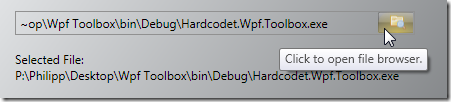
This is a pretty simple user control, which allows you to display a file dialog to open or save files. Its look can be easily adjusted, and it provides built-in truncation of the file string to a predefined length if necessary. Here’s the XAML for the above sample control:
<files:FileSelector x:Name="openFileSelector"
                    Mode="Open"
                    MaxDisplayLength="50"
                    Height="24"
                    Width="400" />
The TextBlock in the screenshot which displays the full file path was simply bound to the control’s FileName dependency property:
<TextBlock Text="{Binding ElementName=openFileSelector, Path=FileName}" />
The control does not provide too many extension or styling points – the idea is that you just copy it into your solution, adjust the styling of the control’s contents (Border, Button etc.) and be on your way. The source comes with a small sample project – enjoy 🙂


Unfortunately, the WPF file dialogs don’t support Vista-style dialogs, even with .NET 3.0 SP1 installed.
https://connect.microsoft.com/feedback/ViewFeedback.aspx?FeedbackID=333025&SiteID=212
I would suspect it’s suffering from the symptons discussed here:
http://www.kirupa.com/net/using_open_file_dialog_pg4.htm
what do i need to do to use this in my code ?
I copied the controls folder into my project but its giving me errors ? is there a dll that i can include as a reference ?
Thank you for this!
I was searching the whole web for sth like this.
M$ didn’t care enough to add it to WPF.