WPF NotifyIcon

September 22nd, 2009

This is an implementation of a NotifyIcon (aka system tray icon or taskbar icon) for the WPF platform. It does not just rely on the Windows Forms NotifyIcon component, but is a purely independent control which leverages several features of the WPF framework in order to display rich ToolTips, Popups, context menus, and balloon messages. It can be used directly in code or embedded in any XAML file.
image


Download Control & Sample Application

(Latest release: 1.0.4, 2009.09.22)


Features at a glance

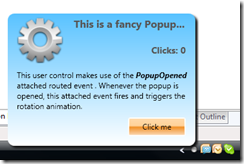
  • Custom Popups (interactive controls) on mouse clicks.
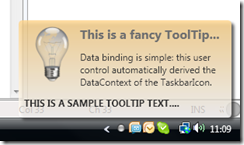
  • Customized ToolTips (Vista and above) with fallback mechanism for xp/2003.
  • Rich event model including attached events to trigger animations in Popups, ToolTips, and balloon messages. I just love that.
  • Full support for standard Windows balloons, including custom icons.
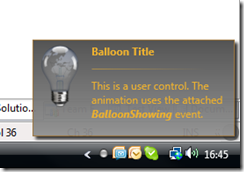
  • Custom balloons that pop up in the tray area. Go wild with styles and animations :)
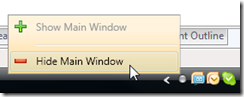
  • Support for WPF context menus.
  • You can define whether to show Popups on left-, right-, double-clicks etc. The same goes for context menus.
  • Simple data binding for Popups, ToolTips and custom balloons through attached properties and derived data context.
  • Command support for single / double clicks on the tray icon.

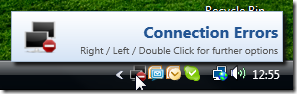
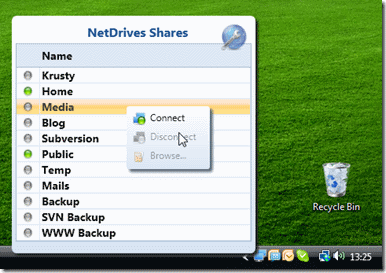
    Screenshots

    The screenshots below were taken from NetDrives and the sample application.
    quickaccess


    image


    image


    image


    image


    XAML Declaration Sample

    The sample below shows some of the properties of the control. For a more comprehensive sample, have a look at the sample application that comes with the download.

    <Window
      x:Class="Hardcodet.NetDrives.UI.SystemTray.Sample"
      xmlns="http://schemas.microsoft.com/winfx/2006/xaml/presentation"
      xmlns:x="http://schemas.microsoft.com/winfx/2006/xaml"
      xmlns:tb="http://www.hardcodet.net/taskbar">
    
        <tb:TaskbarIcon x:Name="myNotifyIcon"
                        Visibility="Visible"
                        ToolTipText="Fallback ToolTip for Windows xp"
                        IconSource="/Images/TrayIcons/Logo.ico"
                        ContextMenu="{StaticResource TrayMenu}"
                        MenuActivation="LeftOrRightClick"
                        TrayPopup="{StaticResoure TrayStatusPopup}"
                        PopupActivation="DoubleClick"
                        TrayToolTip="{StaticResource TrayToolTip}"
          />
    
    </Window>
    1. Bart Roelant
      October 26th, 2009 at 06:45 | #1

      Great stuff.

      Can you explain how I use this to do something like:

      - user drags files or folders onto the trayicon
      - usercontrol pops up and user can drop the files onto the usercontrol

      I do not seem to find how to wire up the drag over / drop events …

    2. David
      November 6th, 2009 at 16:37 | #2

      Are you planning to put this somewhere like codeplex? It would be great as we could then hook into codeplex source control so we can always keep in sync with the latest.

      Thanks

    3. November 6th, 2009 at 17:21 | #3

      David,
      No, the control is a part of my own repository, so I’ll keep the sources here. However, if you want to keep up-to-date, you can subscribe to the blog’s feed - I’m announcing all updates here.

      Cheers,
      Philipp

    4. Sam
      November 9th, 2009 at 09:59 | #4

      Hi,

      This is great but have you considered how to show multiple balloons? I have a scenario where one baloon may be showing and another baloon is requested?

    5. Neal Hudson
      November 10th, 2009 at 13:10 | #5

      Hi Phillip,

      Just wanted to say congrats on a great piece of code! Thanks for sharing it
      Neal

    6. November 12th, 2009 at 15:11 | #6

      Hi,

      Is this sample code availible in vb?

      Regards,

    7. November 12th, 2009 at 16:09 | #7

      @Sam
      Sam, there is actually a way to keep the balloon open. Have a look at the CloseBalloon method in the control. You will see that if the BalloonClosing event is being handled (setting the Handled property of the method to true), the popup is *not* being closed.

    8. November 12th, 2009 at 16:11 | #8

      @Neal Hudson
      Thanks for your kind words. Happy coding :)

    9. November 12th, 2009 at 16:13 | #9

      @Jacobus
      C# only, I’m afraid. However, you could open the compiled sample in Reflector, which can also decompile the code to VB, I think. For snippets, you could still use a C#->VB converter. There are a few of them on the net where you can just convert C# code on the fly to VB.NET.

    10. November 12th, 2009 at 16:14 | #10

      @Bart Roelant
      Bart,
      I would have to find out how to DND onto the tray myself. Keep in mind that the tray icon itself is not a WPF or .NET component - this is pure Windows API. You will have to search the WWW into that direction.

    11. November 13th, 2009 at 10:13 | #11

      @Philipp Sumi
      This sounds like a mission. I think it would be easier just to do the project over in C#.

      Thanx for the quick response.

    12. November 13th, 2009 at 10:15 | #12

      @Jacobus
      Just in case you don’t know yet: You can easily use the compiled (C#) assembly in a VB project.

    13. RS
      January 26th, 2010 at 22:44 | #13

      Simple question: how to use the notify icon without putting this into the window.
      My use case - only what I have is the application.

    14. January 27th, 2010 at 10:51 | #14

      @RS

      You can easily declare the control in code:

      TaskbarIcon tbi = new TaskbarIcon();
      tbi.Icon = Resources.Error;
      tbi.ToolTipText = "hello world";
      
    15. arj
      January 30th, 2010 at 11:59 | #15

      License?

    16. January 30th, 2010 at 16:19 | #16

      @arj
      CodeProject Open License (CPOL)

    17. Jang
      February 9th, 2010 at 03:39 | #17

      ContextMenu was used.
      And, ContextMenu was used Command.
      But ContextMenu was Disabled.
      How to use the ContextMenu and Command?

    18. Graham
      March 25th, 2010 at 20:07 | #18

      What about memory consumption? Any hints or tricks to keep memory down when the balloons/windows are not being shown? WPF apps consume quite a bit of memory compared to a native tasktray application. Call the garbage collector? call Win32 APIs like SetWorkingSetSizeEx (I may have misremembered the name of the API but you get the idea)

    19. March 25th, 2010 at 23:47 | #19

      Graham,
      I’d leave it up to the runtime to free memory when not needed. If you’re (WPF) app is minimized to the tray and there is no UI living, you shouldn’t really have to worry about memory consumption - unused RAM will be freed if necessary, so in practice, there won’t be any difference to manually running the GC when it comes to system performance.

    20. Dan
      March 27th, 2010 at 16:55 | #20

      I am having an issue binding IconSource to a Boolean and using a converter to return my Icons. When I put a break point in my converter it doesn’t break. the Notification Icon shows in the tray but the icon is blank. Anyone have an idea how to fix this?

      Thanks,
      Dan

    21. Hamish
      April 15th, 2010 at 04:59 | #21

      Hi, I ran the solution using VS2010 (upgraded the solution file) on Windows 7 64 bit. The standard operating system balloons worked with the standard icons but the custom icon option did not popup.

      I noticed this after my program using your library stopped popping up after I moved to windows 7 on my new computer. I have reverted back to a standard system icon in the mean time as a workaround…

      Thanks

    22. April 15th, 2010 at 08:06 | #22

      Hamish,

      The sample project runs fine under Win7 x64 with both VS2008 and VS2010. Migrating the project to .NET 4.0 still displayed the correct custom icon on the balloon. Can you verify that the sample project that comes with the control works as expected?

    23. April 15th, 2010 at 23:45 | #23

      Hi Philipp - I have figured out how you can reproduce this. It happens after you right click desktop -> Personalize -> Display and change the text size to something higher than 100%.

      I changed mine back to 100% (from 125%) to test and the popup displayed as usual. To be honest this windows feature has caused the odd bit of software I have to go slightly odd so it’s not just this (majority of things are still OK though). However, with laptops having such high resolutions these days (hence small text), I’m thinking that increasing the text size may be quite a popular option that people do.

      Sounds like it could be a possible nightmare to fix though.

    24. April 20th, 2010 at 00:03 | #24

      Are you God ?

      You are amazing thanks for it…

    25. Daub
      April 28th, 2010 at 16:21 | #25

      I can’t seem to figure out how to wire up the left click of the Taskbar Icon to a function in my MainWindow class to restore the main window. I got it to link to a seperate class like you have in your example. From there i could create a new main window but thats not what i want to do. Please help.

    26. Morris
      April 29th, 2010 at 14:59 | #26

      Thanks a lot for this.

      One thing, do you know why the DynamicResource are not working in Taskbar? It works but it didn’t update when the resource is changed. I was just trying to change the text on Taskbar context menu.

      Thanks again. :)

    27. Ozon
      May 1st, 2010 at 14:27 | #27

      Great thanks.
      This is a amazing control!

    28. James
      May 3rd, 2010 at 11:04 | #28

      Thanks so much for your work on this! It is fabulous! :)

    29. May 7th, 2010 at 07:56 | #29

      Awesome. Great work.

    30. ShaneB
      June 18th, 2010 at 15:43 | #30

      Great job with this! One extremely minor note: In NotifyIconData.cs setting the fixed timeout to 10 has no effect since you’re immediately set it again a few lines down :)

    31. June 18th, 2010 at 16:06 | #31

      Nicely spotted, Shane! I’ll have to look into that, this might actually be an indicator for a bug.

      Thanks for telling (and your kind words, of course) :)

    32. candritzky
      June 18th, 2010 at 19:13 | #32

      Awesome work, thanks a lot!

      I only have an issue with the standard balloon tips: They don’t show up on Windows XP SP3. Aren’t they supported on XP?

    33. candritzky
      June 20th, 2010 at 13:10 | #33

      Update: It didn’t work only on one specific Windows XP machine. Tried another one today and found it working perfectly. Forget about it, seems to be a problem with one of my machines.

    34. Priji John
      June 24th, 2010 at 18:46 | #34

      Awesome work, thanks a lot!

      How can i play a sound when the Popup is displayed..Is it Possible?

    35. June 24th, 2010 at 21:17 | #35

      @Priji John
      Probably the simplest solution is to just register an event listener for the event that fires if the popup is being opened (TrayPopupOpen) and trigger the sound from code. As an alternative, you could also use the attached event that is fired for your popup control and trigger the sound via a behavior.

    36. Timothy
      July 26th, 2010 at 03:38 | #36

      Could you please make a vb.net version like for windows forms.

    37. Phillip
      July 30th, 2010 at 10:45 | #37

      A small problem I have with your script, it’s almost like focus doesn’t register as I added a textbox inside a TrayPopup and when you type nothing happens. Even the KeyDown event on the textbox doesn’t fire. Any advice?

    38. Victor
      September 19th, 2010 at 15:25 | #38

      Hi Philipp! Greate work! But there another one extremely minor note:
      Commands dosn’t work when Commands in the ContextMenu, exact ContextMenu items are disabled when Commands is used. Jang already has same issue.

    39. Daub
      September 29th, 2010 at 19:06 | #39

      Did you remove this resource http://www.hardcodet.net/taskbar?

      My XAML will no longer load in the designer.

      The error is

      The type ‘tb:TaskbarIcon’ was not found. Verify that you are not missing an assembly reference and that all referenced assemblies have been built.

      Thank you,
      Chris

    40. October 15th, 2010 at 08:33 | #40

      Great job! Just an issue running your sample project:

      In “Sample Project” -> “Sample windows”-> items in context menu are disabled (gray color).

      I’m using VCS2010 Express and I have convert solution to Framework 4.0 and building solution doesn’t give any error. I just found in NotifyIconResourse.xaml: Command=”{Commands:ShowSampleWindowCommand}” and Command=”{Commands:HideSampleWindowCommand}” underlined with this advice: “No constructor for type ‘HideSampleWindowsCommand’ has 0 parameters.”

      where’s the problem??

      Thank you!

    41. Mike
      October 28th, 2010 at 09:18 | #41

      Hi, first of all nice library! But I have a problem with the context menu of the TaskbarIcon. I added some entries to the context menu and tried to use a command like ApplicationCommands.Close on one of these menu items. At runtime the menu item witch is bound to the command is all time disabled. What is wrong?

    42. Jeroen de Zeeuw
      November 7th, 2010 at 09:10 | #42

      @Victor Same here (problem with Commands and ContextMenu’s). Great library though, thanks for sharing!

    43. Nathan Phillips
      November 22nd, 2010 at 10:22 | #43

      Are you aware of HwndSource in System.Windows.Interop? It would simplify some of your code.

    44. November 23rd, 2010 at 17:03 | #44

      Nathan,

      I am :). What kind of simplification are you suggesting?

    45. Morey
      November 25th, 2010 at 10:58 | #45

      Daub :
      Did you remove this resource http://www.hardcodet.net/taskbar?
      My XAML will no longer load in the designer.
      The error is
      The type ‘tb:TaskbarIcon’ was not found. Verify that you are not missing an assembly reference and that all referenced assemblies have been built.
      Thank you,
      Chris

      Same problem with Daub.What a pity!
      Thanks anyway.

    46. November 25th, 2010 at 11:04 | #46

      @Morey and Daub:
      The URI is just the namespace identifier - there’s nothing to download there. If the type cannot be resolved, you probably have a missing reference. Please compare with the sample project in order to determine what’s missing.

    47. Robbert Dam
      November 30th, 2010 at 06:01 | #47

      Thanks for this great lib! I’ve used the control for quite a while now. A question: I wonder if it’s possible to control the Z-order of the popup. The popup in my application sometimes “conflicts” with a popup of another application. I want to render my popup “always-on-top”. Is there an easy way to do this?

    48. Chris Baker
      January 5th, 2011 at 16:03 | #48

      I was in the process of writing my own version of a wpfnotifier as there isn’t a native one in the WPF library. Thankfully I came across your code before I got too far with it as yours is excellent. So thanks for sharing it.

      I do have a question though. It works fine on my Win 7 (64bit) machine, but when I try and use it a Vista machine I have trouble getting it to close. I call the dispose method and then close the app and it remains in memory running until I either stop debugging or use process manager to kill it manually. This is the same code on Win 7 but it closes normally. To reproduce the problem the notifyicon must either open a window or display a pop up of some kind (such as a tooltip) then it won’t close otherwise it does ?!?!? Have you come across this issue? I’m still working toward a solution and if I find one I’ll let you know, but if you’ve already isolated the issue, if you could let me know that would be great.

      Thanks for the great work.

      Chris. B.

    49. Robert
      January 25th, 2011 at 11:56 | #49

      Great Work!
      Thank you very muck!

      I added a textbox inside a popup and when you type nothing happens…
      I don’t know what is the problem.

    50. January 29th, 2011 at 05:11 | #50

      Robert,
      Are you working with the latest version? There was such an issue with an early version of the control…

    Comment pages
    1. May 11th, 2009 at 13:45 | #1
    2. May 26th, 2009 at 18:13 | #2
    3. June 1st, 2009 at 00:52 | #3
    4. June 24th, 2009 at 18:37 | #4
    5. August 4th, 2009 at 06:13 | #5
    6. October 18th, 2009 at 11:00 | #6
    7. October 26th, 2009 at 23:43 | #7
    8. March 11th, 2010 at 17:18 | #8
    9. May 6th, 2010 at 21:18 | #9
    10. May 19th, 2010 at 12:44 | #10
    11. May 27th, 2010 at 14:26 | #11
    12. February 26th, 2011 at 20:07 | #12
    13. September 27th, 2011 at 07:25 | #13